Property maintenance technology makes a property manager’s job easier by replacing phone calls, paper work orders and scattered spreadsheets with one live record of every job. Work orders, before-and-after photos, preventive maintenance schedules and reports live in the same place, so you always know what was done, where, when and by whom.
This guide covers the 7 tools that save property managers the most time on maintenance, the metrics they help you track, what to look for before adopting a new system and how AMB Services uses technology on every job for apartment communities and condominiums in Florida.
Why Maintenance Is Hard to Manage Without Technology
On a multifamily property, maintenance happens across dozens or hundreds of units, several vendors and many residents at once. Without the right tools, much of a property manager’s day goes into chasing information instead of acting on it:
- Calling or texting technicians and contractors just to ask whether a unit is finished.
- Work orders on paper, in emails or in a spreadsheet that only one person updates.
- No photos to prove the work was done, or to show owners and condo boards what was found.
- Reports that arrive days after the work, if they arrive at all.
- Preventive tasks forgotten until something fails, turning a small repair into an emergency. See how that drives up costs in our guide to reducing emergency repair costs.
7 Property Maintenance Technology Tools That Save Property Managers Time
1. Digital Work Order Management
A digital work order system captures each request with the unit, the problem, photos and priority, then follows it through assignment, work in progress and completion. Residents or on-site staff submit requests from a phone, technicians update the status from the field and the property manager sees the full history of each unit without asking anyone.
How it makes your job easier: fewer calls, nothing lost in an inbox and a searchable record of repeat problems, like the same leak reported three times in the same stack of units.
2. Photo and Video Documentation with GPS and Time Stamps
Mobile apps let technicians photograph each unit before, during and after the work. When every photo carries its location and time, it becomes evidence: proof that the work was done at that unit on that date.
How it makes your job easier: you can approve work without driving to the property, answer owner and board questions with pictures instead of explanations and settle disputes about damage or incomplete work quickly.
3. Preventive Maintenance Scheduling and Equipment Records
Maintenance software, often called a CMMS (computerized maintenance management system), keeps recurring tasks on a calendar and stores the history of key equipment: HVAC units, water heaters, dryer vents, roofs, pumps and fire safety systems. Tasks are generated automatically, so filter changes, dryer vent cleaning and roof inspections happen on time.
How it makes your job easier: the schedule doesn’t depend on anyone’s memory, and equipment records show age, repairs and warranty status when you plan replacements. Use our multifamily preventive maintenance checklist as a starting point for your calendar.
4. Real-Time Dashboards and Unit Status Tracking
A dashboard shows where every job stands: units pending, in progress, completed or sent back for rework. It is especially useful during unit turnovers, when leasing needs to know exactly which apartments will be ready and when.
How it makes your job easier: you spot bottlenecks before they delay move-ins and can give leasing, owners and regional managers accurate dates. Pair it with our apartment make-ready checklist.
5. Automated Reports and Secure Sharing
Instead of assembling reports by hand, maintenance platforms generate them from the data already collected: PDF reports with photos, Excel exports and lists of items that still need attention. Many tools also let you share a secure link, so an owner or a condominium board member can review progress without creating an account.
How it makes your job easier: owner reports and board meeting packets take minutes instead of hours, and everyone looks at the same information.
6. Scheduling and Route Planning Across Your Portfolio
For managers responsible for several properties, scheduling tools show where crews will be and in what order. A schedule with a route map and a step-by-step timeline makes it easier to coordinate resident notices, gate access and parking for maintenance vehicles.
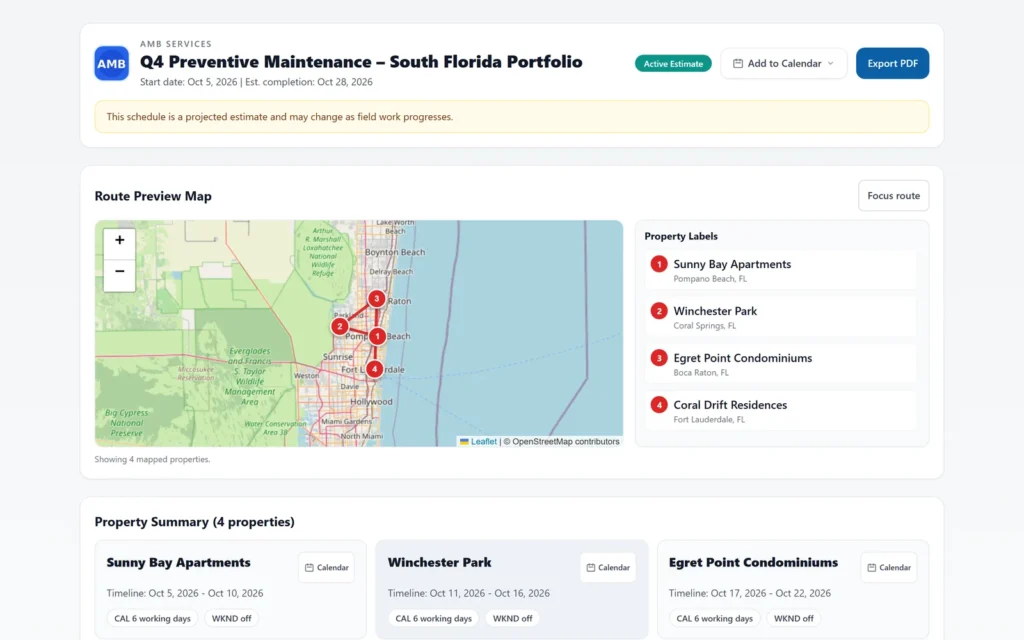
How it makes your job easier: less back-and-forth to confirm dates, and a clear plan you can share with on-site staff at every property.
7. Smart Sensors and Connected Devices
Connected devices send alerts before a small problem becomes a costly one:
- Water leak and flood sensors under water heaters, near washing machines and in mechanical rooms. In multi-story buildings, one undetected leak can reach the units below. The EPA’s WaterSense Fix a Leak Week program has tips for finding common leaks.
- Smart thermostats in vacant units and common areas to control energy use and humidity. ENERGY STAR certified smart thermostats are a good reference.
- Smart locks and access control for vacant units, amenities and mechanical rooms, so vendor access can be granted and tracked without handing out physical keys.
How it makes your job easier: problems are found by an alert, not by a resident complaint or a ceiling stain.
Maintenance Tasks Before and After Technology
| Task | Without technology | With technology |
|---|---|---|
| Receiving requests | Phone calls, sticky notes and emails | Mobile requests with photos and priority |
| Checking job status | Calling the technician or contractor | Live status by unit on a dashboard |
| Proving work was done | The contractor’s word or an invoice | Before, during and after photos with GPS and time |
| Preventive maintenance | A wall calendar or someone’s memory | Recurring tasks scheduled automatically |
| Owner and board reports | Built by hand at the end of the month | PDF and Excel reports generated from job data |
| Finding leaks | A resident complaint or a ceiling stain | A sensor alert as the leak starts |
Want your maintenance documented this way without buying or managing new software? Request a free maintenance proposal.
How AMB Services Uses Technology on Every Job
At AMB Services, technology is part of the service, not an extra system you have to buy and manage. Every client gets access to the AMB App at no additional cost, where property managers, regional managers and owners follow maintenance in real time:
- Live progress by project and unit: pending, in progress, completed or needing rework.
- Photos and videos by phase for every unit, with GPS location, time and technician notes.
- Reports ready to share: a full project PDF, a PDF of only the units that needed rework and Excel exports.
- Secure links for owners and boards that can expire and be revoked, with no extra logins.
- Schedules with a route map and a step-by-step timeline across your properties.
- Email alerts when an issue is reported or a unit is sent back for rework.
- Documentation built for the field: technicians keep working with weak signal, and everything syncs when they reconnect.
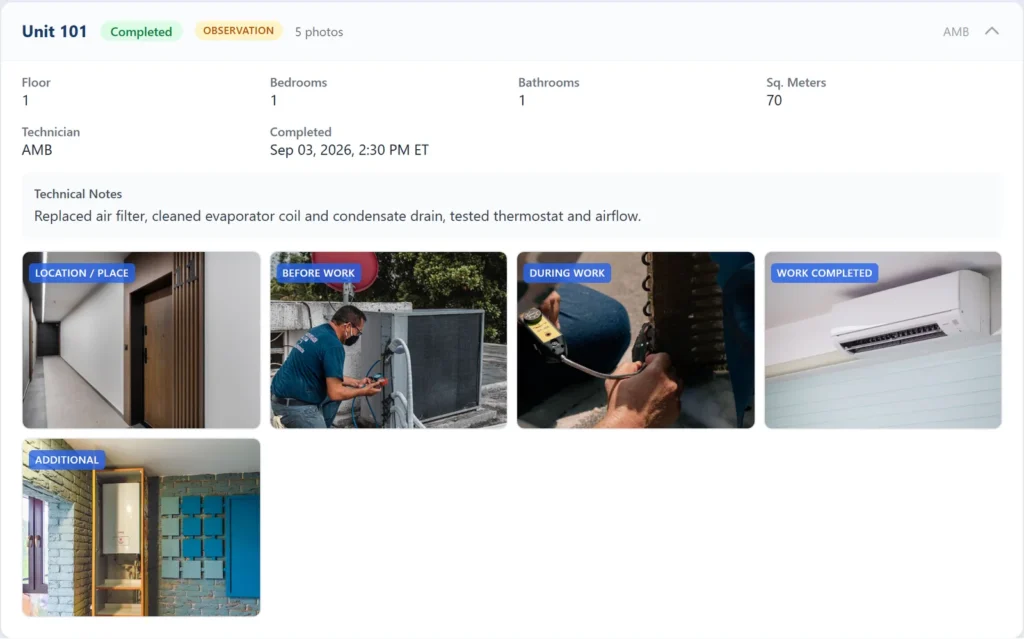
Because our crews do the work and document it in the same app, you don’t have to chase a contractor for updates or train your team on a new maintenance platform.
Maintenance Metrics Technology Helps You Track
Once work orders and inspections are recorded digitally, you can measure maintenance performance instead of guessing:
- Response time: how long it takes from request to first action, for routine, urgent and emergency work.
- Completion time: how long each work order stays open.
- Rework rate: the share of jobs that had to be redone.
- Repeat work orders: the same problem in the same unit or building within a few months, often a sign the root cause was never fixed.
- Preventive vs. reactive work: how much of your maintenance is planned instead of urgent.
- Make-ready days: how many days it takes to turn a vacant unit.
Review these numbers monthly with your team or maintenance contractor. They are also the fairest way to compare in-house and outsourced maintenance.
What to Look for in Maintenance Technology
Whether you buy software for your team or hire a contractor that brings its own technology, check these points:
- Easy for technicians in the field. If documenting a job takes too long, it won’t get done.
- Works with weak or no signal. Mechanical rooms, crawl spaces and parking garages often have poor coverage.
- Photos tied to the unit, date and location, not a shared camera roll.
- Role-based access, so owners, regional managers and on-site staff each see what applies to them.
- Exportable reports in PDF or Excel that you can keep for insurance claims, audits and condo milestone inspection records.
- Secure sharing with links that can be revoked.
- Data privacy: each client should only see its own properties.
- The real cost of adoption: licenses, setup, training and the staff time needed to keep the data up to date.
Technology Works Best with the Right Maintenance Team
Software doesn’t fix a leak or clean a dryer vent. Technology makes good maintenance visible and easier to manage, but results still depend on trained technicians, a clear scope of work and a preventive routine that is actually followed.
Start small: pick the process that generates the most calls, such as make-readies or preventive maintenance, digitize it, measure it for 60 to 90 days and then expand. Before storm season, use the same tools to photograph roofs, drains and common areas for your records, and work through our hurricane preparedness checklist.
See Your Maintenance in Real Time with AMB Services
AMB Services provides property maintenance, preventive maintenance, specialized cleaning and renovations for apartment communities and condominiums across South Florida and throughout Florida. Every job is documented in the AMB App, included at no extra cost for our clients. Send us your property details and receive a proposal within 48 hours.
Frequently Asked Questions
What is property maintenance technology?
Property maintenance technology is the software and connected devices used to request, schedule, document and report maintenance work. It includes digital work order systems, mobile photo documentation, preventive maintenance software, real-time dashboards, reporting tools and smart sensors such as water leak detectors.
How does technology help property managers with maintenance?
It replaces calls, paper and spreadsheets with one live record of every job. Property managers can see the status of each unit, review before and after photos, keep preventive tasks on schedule and share reports with owners and boards without building them by hand.
Do I need to buy maintenance software if I outsource maintenance?
Not always. Many maintenance contractors provide their own work tracking and reporting. AMB Services clients get the AMB App at no extra cost to follow progress, photos and reports for every job, so there is no separate software to buy or manage.
Which maintenance tasks benefit most from technology?
Unit turnovers, preventive maintenance programs, renovations across many units and any work that owners or boards need to verify. These jobs involve many units and deadlines, so live status and photo documentation save the most time.
Does maintenance technology work where cell signal is poor?
It depends on the tool. Choose apps that keep documenting offline and sync when the connection returns. The AMB App works this way, so technicians do not lose photos taken in mechanical rooms, crawl spaces or garages.
Learn more about our comprehensive property maintenance for multifamily communities and our preventive maintenance programs.